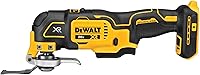
What Is an Oscillating Multi-Tool Used For?
Common oscillating multi tool uses include short plunge cuts, flush trimming, detail sanding, scraping, and grout removal. Choose the attachment for your material, then choose a tool that fits your battery system and work.
On this page (7 sections)
- Which oscillating multi-tool uses are most useful around the home?
- What can you cut with an oscillating multi-tool?
- Can you use it for sanding and scraping?
- Can an oscillating multi-tool remove grout?
- How should you choose and set up an oscillating multi-tool?
- What mistakes shorten blade life or spoil the finish?
- Which oscillating multi-tool uses should guide your final choice?
Common oscillating multi tool uses include plunge cuts, flush trimming, detail sanding, scraping, and grout removal, especially where a larger tool won't fit. The attachment determines what you can work on, so choose it for the material before choosing the tool.
Think of this as a repair tool for small, awkward jobs. It can trim a door jamb for flooring or sand a cabinet corner, but it isn't the first choice for ripping boards or sanding an entire floor.
Which oscillating multi-tool uses are most useful around the home?
The most useful jobs are small cuts and surface repairs near edges, corners, or obstacles. Here's where each attachment earns its place.
| Job | Attachment | Practical limit |
|---|---|---|
| Undercut a door jamb | Wood-cutting blade | Check clearance with a flooring offcut |
| Make a small drywall opening | Suitable plunge blade | Locate wiring and pipes first |
| Trim a small fastener | Blade rated for that metal | Avoid thick stock and unsupported pieces |
| Sand a cabinet corner | Detail sanding pad | Use a larger sander on broad panels |
| Lift adhesive or caulk | Suitable scraper | A steep angle can gouge the surface |
| Clear grout around a damaged tile | Grout-removal accessory | The blade must fit inside the joint |
A plunge cut starts within a surface rather than from an open edge. A flush cut trims material close to a neighboring surface, such as shortening a jamb so flooring can slide underneath.
For larger demolition cuts, compare the jobs in our reciprocating saw and oscillating multi-tool guide.
What can you cut with an oscillating multi-tool?
You can cut wood, drywall, plastic, and some metal when the blade is rated for the material. Blade fit alone doesn't make an accessory suitable for every cut.
Oscillating multi-tool uses for wood and trim
Use a wood blade for short notches, trim adjustments, and jamb undercuts. For flooring clearance, rest the blade on an offcut of the flooring and underlayment to guide the cut height, while protecting nearby finished surfaces.
If nails may be present, choose a blade rated for nail-embedded wood. Don't keep pushing a plain wood blade after it strikes a fastener.
The DeWalt 3-Piece Oscillating Assortment suits readers who already own a compatible tool and need cutting accessories. Its DWA4258 has a PlungePoint tip, while the DWA4283 uses a 3-sided design for drywall plunge and rip cuts and wood containing nails.
The DWA4283 has a 2 1/8-inch cutting width intended for single-gang electrical box openings. Mark the actual box outline before cutting rather than treating blade width as a complete template.
Skip this assortment if your project mainly needs sanding, scraping, or grout removal. Those jobs require different attachments, and accessory fit needs checking before you buy.
Cutting drywall and plastic
A suitable plunge blade can make a small drywall access opening or box cutout. Locate hidden services, isolate affected circuits, and keep the cut only as deep as needed.
Our guide to cutting drywall with an oscillating multi-tool explains cut planning. For a long cut across a loose sheet, scoring with a utility knife and straightedge is often simpler.
For plastic, use a blade rated for that material and start at a lower speed. Pause if the edge starts melting or smearing instead of cutting cleanly.
Cutting small metal pieces
A suitable metal blade can trim a small fastener or thin metal piece within its stated limits. Check the metal type and thickness the blade can handle, then secure loose material so it can't chatter.
Keep sparks and hot fragments away from nearby materials. For thick stock or repeated larger cuts, choose a saw intended for that work.
Can you use it for sanding and scraping?
Yes, detail sanding and small scraping jobs are useful reasons to own a multi-tool. It reaches edges and corners, but its small working area makes broad surface preparation slow.
Use a triangular sanding pad flat against the surface, with abrasive paper suited to the job. Leaning hard on the tip can leave a hollow and wear the paper unevenly.
Start with the least aggressive grit that removes the defect, then move to finer grits. Replace clogged or worn paper rather than pressing harder.
For scraping, hold the attachment at a shallow angle and work from an exposed edge. Try a hidden spot first, since a rigid scraper can cut into wood or mark a finished surface.
Before disturbing old paint or adhesive, check for possible lead or asbestos. Material that may contain either needs an appropriate removal plan.
Who should choose the DeWalt XR kit?
Choose the DeWalt XR Oscillating Tool Kit if you're starting without a compatible battery and want a battery, charger, and cutting blades together. Its controls also suit jobs where you want to ease into a cut.
The kit combines a 3-speed selector with a variable-speed trigger, plus a quick-change system for accessory swaps without wrenches. An LED helps light the work surface, and the universal accessory adaptor supports most oscillating accessory brands.
The included blades cover wood and wood/metal cutting. Add a sanding pad or scraper for surface preparation, and skip this kit if you already have another battery system you intend to keep using.
Can an oscillating multi-tool remove grout?
Yes, a grout-removal accessory can clear individual joints around a tile repair. Choose a blade narrower than the joint so it can work without rubbing both tile edges.
Start with shallow passes through the center, then remove more depth as needed. Don't twist the blade against a tile to hurry the job.
Grout dust can contain silica, so use suitable dust control, eye protection, and respiratory protection. Our guide to removing grout with an oscillating multi-tool covers the steps.
Use a hand grout tool where the joint is too narrow for safe powered access. A whole room of grout removal is also a different workload from clearing the edges of one damaged tile.
Who should choose the Makita XMT03Z?
Choose the Makita XMT03Z if you have compatible Makita batteries and prefer a speed dial with a lock-on slide switch. That control layout suits steady passes when sanding or clearing a joint.
Its dial covers 6,000–20,000 OPM, and soft start helps ease into the work. The package includes a 1 1/4-inch bi-metal plunge blade and 2 accessory adapters.
This is a tool-only model requiring a compatible Makita 18V Lithium-Ion battery with the Star symbol. Skip it if you need a complete starter kit, and budget for a separate grout accessory if tile repair is your main job.
How should you choose and set up an oscillating multi-tool?
Choose the attachment, battery system, and controls around your most common job. Maximum speed matters less than having the correct accessory and a grip you can control in the available space.
Check the accessory's mounting pattern, material rating, working width, and reach. An adaptor can expand compatibility, but don't assume every blade fits every tool.
For a broader comparison of power sources and controls, see how to choose an oscillating multi-tool.
Who should choose the Ryobi ONE+?
Choose the Ryobi ONE+ Multi-Tool for occasional repairs if you already have a compatible ONE+ battery and charger. It offers a variable-speed dial reaching 20,000 OPM, a lock-on button, and on-board accessory storage.
The battery and charger are sold separately. Skip it if you're starting from scratch and prefer one package containing the power source, or if your main work calls for a larger saw or sander.
Set up before you squeeze the trigger
Remove the battery before fitting or repositioning an attachment. Seat it fully, secure the clamp as the manual directs, and check that the accessory clears the tool body.
Mark the cut, support the work, and arrange the blade angle so your hands stay clear of its path. Start slowly on scrap material to learn how the attachment enters the surface.
For the full sequence, follow our guide to using an oscillating multi-tool.
What mistakes shorten blade life or spoil the finish?
The main mistakes are forcing the cut, using the wrong attachment, and letting heat build up. Light pressure lets the accessory work while making it easier to keep the cut on your mark.
If cutting slows, stop and check for worn teeth, trapped debris, or an unexpected fastener. More pressure won't restore a dull blade.
Don't sand with torn paper or scrape with debris trapped under the edge. Both can leave marks that take longer to remove than the original defect.
Let hot accessories cool before handling them, then remove the battery and clean away dust as the manual directs. Check blades for damage, keep sanding-pad fasteners clean, and store sharp accessories where their edges won't strike each other.
Which oscillating multi-tool uses should guide your final choice?
Let your next few repair jobs guide the purchase. For oscillating multi tool uses such as jamb trimming, small cutouts, and corner sanding, buy the attachments you need now rather than a large assortment of unrelated pieces.
Choose the DeWalt XR kit when you need a complete cordless starting point. Choose the Makita XMT03Z or Ryobi ONE+ when the matching battery system is already part of your tools.
Choose the DeWalt blade assortment only if you already have a compatible tool and need its cutting options. For projects centered on rough demolition and larger cuts, start with our reciprocating saw guide.
Frequently asked questions
What is an oscillating multi-tool best used for?
An oscillating multi-tool is best for short cuts and detail work in tight spaces, including trimming door jambs, making small drywall openings, sanding corners, scraping adhesive, and removing grout. Choose an attachment rated for the material, and use a larger saw or sander for long cuts or broad surfaces.
Can an oscillating multi-tool cut wood?
Yes, an oscillating multi-tool can cut wood with a suitable wood-cutting blade; it suits short plunge cuts, notches, and flush trimming around flooring or cabinets. If the wood contains nails, use a blade rated for nail-embedded wood; a circular saw or jigsaw is usually better for long cuts.
Can an oscillating multi-tool remove grout?
Yes, a grout-removal accessory can clear grout when its width fits inside the joint; keep it centered, make shallow passes, and avoid touching tile edges. Use suitable dust control and respiratory protection because grout dust can contain silica, and choose a hand tool where a powered blade won't fit safely.
Is an oscillating multi-tool the same as a reciprocating saw?
No, an oscillating multi-tool moves its accessory through a small side-to-side arc for detail work, while a reciprocating saw moves a longer blade back and forth for larger cuts. Choose the multi-tool for small cutouts and flush trimming, and a reciprocating saw for suitable demolition or rough cutting tasks.