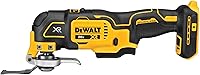
DeWalt vs Makita Oscillating Multi-Tool: Which Is Better? (November 2026)
For Makita multi tool vs DeWalt, choose Makita for existing LXT batteries and dial control, or DeWalt for frequent blade swaps and trigger control. Get the DCS356C1 kit if you also need a battery and charger.
On this page (10 sections)
- Makita multi tool vs DeWalt: how do their controls differ?
- Which tool makes accessory changes easier?
- How do the grip and work light compare?
- Should you buy a tool-only model or a kit?
- Which model fits your current battery system?
- Which jobs favor Makita, DeWalt or a different tool?
- How should you set up either tool for the first cut?
- What common mistakes waste blades or spoil the cut?
- How do you care for the tool and accessories?
- Which DeWalt or Makita oscillating multi-tool should you choose?
Choose Makita for compatible LXT batteries and dial control, or DeWalt for frequent accessory changes and trigger control. The most useful Makita multi tool vs DeWalt comparison starts with your battery setup and the way you make cuts.
The Makita XMT03Z suits someone who wants to set a speed before working. The DeWalt DCS356B suits someone who wants to adjust speed at the trigger while moving between small repair tasks.
If you have neither battery system, the DeWalt DCS356C1 kit is the simplest starting package here. It adds the battery and charger to the same DCS356 tool, rather than giving you a different class of cutting performance.

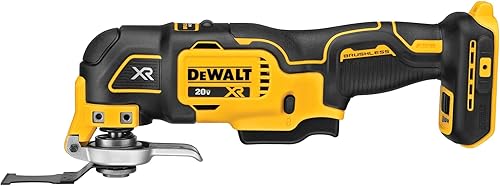 Best for frequent accessory swaps
DeWalt DCS356B XR Oscillating Multi-Tool
Makita multi tool vs DeWalt: how do their controls differ?
Makita uses a speed dial and slide switch, while DeWalt combines a 3-speed selector with a variable-speed trigger. Choose the control style that matches how often you start, stop and change pace.
The XMT03Z dial covers 6,000–20,000 OPM, with a large on/off slide switch and lock-on button. It also has soft start, which helps you begin work with more control.
The DCS356B offers ranges of 0–13,000, 0–17,000 and 0–20,000 OPM. Its Dual-Grip trigger lets you vary speed within the selected range as you work.
Think of the DeWalt selector as a way to limit your available speed, with the trigger handling smaller adjustments. That suits short plunge cuts where you want a gentle start before increasing pace.
Which Makita or DeWalt multi-tool controls suit your work?
Choose Makita for setting a working pace in advance, or DeWalt for changing pace during the cut. A series of similar trim cuts favors a different workflow from switching between delicate starts and longer cuts.
Makita's arrangement suits you if you prefer separating speed selection from the on/off action. Skip it if your main priority is starting near zero and increasing speed through trigger pressure.
DeWalt suits you if you want speed changes under your finger. If you prefer a slide switch and a separate dial, the Makita layout deserves a closer look before you commit to another battery system.
Neither maximum speed nor voltage wording settles cutting performance. Blade condition, material, feed pressure and the way the tool meets the work all affect the result.
Which tool makes accessory changes easier?
DeWalt is the clearer choice for frequent blade and attachment changes because its Quick-Change system works without wrenches. That matters when one repair involves cutting trim, scraping residue and then sanding an edge.
The Makita includes adapters for most competitive accessories, while DeWalt includes a universal accessory adapter for most oscillating tool accessory brands. Check the exact fitting before reusing blades from another tool.
An adapter expands your options, but it does not make every accessory fit or use the same change procedure. Follow the mounting instructions for the tool, adapter and attachment together.
For repeated cuts in one material, blade-change convenience may matter less than your preferred controls. For varied repairs, fewer steps between attachments can make DeWalt the more useful choice.
Remove the battery before changing accessories, and let a hot blade cool before handling it. Our guide to how to use an oscillating multi-tool covers setup and handling in more detail.
How do the grip and work light compare?
Makita offers a small barrel grip, while DeWalt adds an LED for dark work surfaces. Grip shape matters during awkward cuts, and lighting matters when the cut line sits inside a cabinet or corner.
The XMT03Z's barrel grip measures 2⅜ inches in diameter. If possible, hold the tool with the battery you expect to use, since the complete setup matters more than the bare handle alone.
Check whether you can reach the controls without loosening your hold. A grip that feels manageable on an open bench may feel different when the blade is turned sideways against a door casing.
DeWalt's light helps show the work surface, but your hands or surrounding trim can still cast shadows. Use separate workspace lighting when you need a clear view of the blade path and its endpoint.
Don't choose either model on handle size alone. Your ability to brace your arms, see the cut and keep the accessory flat against the work matters during close cuts.
Should you buy a tool-only model or a kit?
Buy tool only when you already have a compatible battery and charger. Choose the DeWalt kit when you need those items, rather than treating the kit as a more powerful version of the tool.
The Makita XMT03Z needs a Makita 18V Lithium-Ion battery with a Star symbol. The DeWalt DCS356B also needs its own compatible battery and charger, and batteries from the two brands are not interchangeable.
Buying into another platform adds equipment to store and keep charged. Unless you strongly prefer the other tool's controls, your existing compatible batteries are a sensible reason to stay with one brand.
What comes with each multi-tool?
The Makita includes a 1¼-inch plunge blade and 2 adapters. Its battery and charger are separate, so it suits an existing Makita setup better than a first cordless purchase.
The tool-only DeWalt DCS356B includes a universal accessory adapter and 2 wood-cutting blades. It makes sense when you already have the battery equipment and mainly need another tool.
The DCS356C1 kit includes one battery, a DCB107 charger, a wood-cutting blade, a wood-and-metal blade, a universal adapter and a kit bag. One battery is enough to begin, but longer work sessions need a plan for charging breaks.
None of these packages supplies every attachment for every job. Add a suitable sanding pad, scraper or grout accessory only when your planned work calls for it.
Which model fits your current battery system?
Keep your existing compatible platform unless the other tool solves a clear problem with your workflow. A familiar charging setup is useful when an oscillating tool handles brief cuts between other jobs.
For Makita owners, the XMT03Z offers a direct way to add cutting, sanding and scraping tasks without starting another battery system. Skip it if you need a complete battery package and don't specifically want its controls.
For DeWalt owners, the DCS356B avoids buying another charger and battery you may not need. Skip the tool-only version if you have no compatible power source ready for it.
For buyers starting fresh, the C1 kit puts the main equipment together. Skip that kit if you already have enough compatible batteries and would rather choose your own accessories.
Our oscillating multi-tool guide explains how to match features to your work. If you're unsure whether this tool category fits the job, read reciprocating saw vs oscillating multi-tool before buying.
Which jobs favor Makita, DeWalt or a different tool?
Choose Makita for repeated work at a chosen pace, and DeWalt for repairs with frequent starts and accessory swaps. Choose a different tool when the job calls for long cuts or heavy material removal.
For door-jamb undercuts and small trim adjustments, either can work with a suitable blade. Mark the cut height, support the tool and use a scrap of the flooring material as a height reference where appropriate.
For cabinet repairs that mix cutting and scraping, DeWalt's accessory system is a useful reason to choose it. Its trigger control also fits the stop-and-start nature of small cuts around corners.
For detail sanding, Makita's dial lets you choose a working speed before moving over the surface. Keep the pad flat and use light pressure, since pressing harder can round an edge or leave uneven marks.
Makita gives the XMT03Z a 3.2° oscillation angle, which it says is engineered for faster, more aggressive cutting and sanding. That feature still needs the right accessory and controlled pressure for finish work.
Skip both for long sheet cuts, repeated thick-stock crosscuts or large-area sanding. An oscillating multi-tool earns its place through access and small, controlled work rather than covering large areas quickly.
How should you set up either tool for the first cut?
Start with the correct accessory, a secure workpiece and a clear blade path. Good setup prevents more mistakes than choosing the highest speed setting.
- Match the blade to the material. Use a wood blade for clean wood and a suitable metal-capable blade where fasteners may be present.
- Remove the battery before mounting. Seat the accessory fully and secure it according to the tool's instructions.
- Choose a useful blade angle. Position it so the tool body clears nearby walls, trim and hardware.
- Mark and support the work. Clamp loose pieces and check what lies beyond the cut.
- Begin at a controlled speed. Establish a shallow groove before applying more feed pressure.
For a plunge cut, let the teeth start the opening instead of pushing the blade face hard into the surface. Follow the accessory maker's guidance for the material and cutting direction.
When cutting installed walls, locate wiring and pipes before starting. Wear eye and hearing protection, and use suitable dust control and respiratory protection for the material.
For sanding, begin with an abrasive that suits the amount of material you need to remove. Move through finer grits as needed instead of trying to erase deep marks with fine paper alone.
What common mistakes waste blades or spoil the cut?
The biggest mistakes are forcing the blade, using the wrong attachment and cutting deeper than needed. These problems affect either brand and can make a suitable tool seem poorly matched to the job.
Pushing harder when progress slows creates heat and reduces control. Back off, clear debris and inspect the teeth before deciding that more pressure is the answer.
Using a wood-only blade around hidden fasteners can damage its cutting edge. Inspect old trim and choose a suitable wood-and-metal blade when nails are part of the cut.
Starting at full speed on a finished edge makes it harder to establish a clean starting point. Begin gently, then increase speed as the blade settles into the cut.
Running a wide blade into a tight corner can damage the surface beside the repair. Pick an accessory narrow enough for the opening and plan where its sides will travel.
Treating the included blades as a complete accessory set leads to poor matches for scraping or grout removal. Buy attachments for the next job rather than forcing one blade to do unrelated work.
Plunging through a wall without a depth plan risks reaching hidden services. Mark the required depth on the blade as a visual reference, while recognizing that a mark does not physically stop the cut.
How do you care for the tool and accessories?
Keep vents clear, accessories clean and cutting edges in good condition. Remove the battery before cleaning or inspecting the tool, and follow its manual for care and storage.
Brush loose dust from the housing and accessible vents without pushing debris inside. Inspect the accessory mount for buildup that could prevent a blade or adapter from seating properly.
Let hot attachments cool before storing them. Keep blades dry and protect their teeth from loose hardware so they're ready for the next repair.
Replace damaged accessories rather than compensating with extra pressure. For model details before you buy, read our Makita XMT03Z review or DeWalt DCS356B review.
Which DeWalt or Makita oscillating multi-tool should you choose?
In this Makita multi tool vs DeWalt decision, buy the XMT03Z for an existing Makita setup and dial-based control. Buy the DCS356B for an existing DeWalt setup and frequent accessory changes, or the C1 kit when you also need battery equipment.
Before ordering, write down your first 2 jobs and the attachments each requires. That turns the choice into a usable setup and helps you avoid buying a tool without the blade or battery needed to begin.
If neither control layout fits your work, compare the best oscillating multi-tools for other options.
Frequently asked questions
Is Makita or DeWalt better for an oscillating multi-tool?
DeWalt is the better fit for frequent accessory swaps and speed changes at the trigger; Makita suits buyers who prefer a speed dial and already have compatible LXT batteries. Choose around those differences first, then decide whether you need a tool-only package or a kit.
Does the Makita XMT03Z include a battery?
No, the Makita XMT03Z comes without a battery or charger; it works with Makita 18V Lithium-Ion batteries bearing a Star symbol. It includes a plunge blade and 2 adapters, so buyers starting without compatible batteries must also plan for the battery and charger.
What is the difference between the DeWalt DCS356B and DCS356C1?
The DCS356B is the tool-only choice, while the DCS356C1 adds a battery, charger and kit bag; both use the DCS356 tool with its speed selector, variable-speed trigger, Quick-Change system and LED. Buy the kit for its included equipment, rather than expecting a different cutting tool.
Can Makita and DeWalt multi-tool blades be swapped?
Some blades can fit both tools, but you must check the attachment fitting and any adapter requirements; both tools include adapters for broad accessory compatibility. That does not make every blade interchangeable, and a blade that mounts correctly still needs to suit the material you plan to cut.
Which oscillating multi-tool should you choose for detail work?
Choose DeWalt if you want to ease into cuts with a variable-speed trigger and light a dim work surface; choose Makita if you prefer a preset dial speed and barrel grip. For either tool, a narrow suitable blade, a visible cut line and light pressure matter for detail work.