DeWalt DCS356B Oscillating Multi-Tool Review: Worth It? (November 2026)
The DeWalt DCS356B is a strong choice for DeWalt battery owners doing trim cuts and small repairs. Choose the DCS356C1 kit if you also need a battery and charger.
On this page (10 sections)
- What makes the DeWalt DCS356B worth choosing?
- What comes with the bare tool, and what else do you need?
- Which cordless alternative suits your work?
- Which jobs suit an oscillating tool, and which need another saw?
- How should you set up the DCS356B before the first cut?
- How do you get cleaner cuts without forcing the tool?
- What should you expect from battery runtime?
- Which common mistakes cause poor results?
- How should you care for the tool and attachments?
- Should you choose the DeWalt DCS356B or another package?
The DeWalt DCS356B is a strong choice for DeWalt battery owners who need controlled trim cuts, small repairs and detail work. Its tool-only package makes the most sense when you already have a compatible battery and charger.
For a new cordless buyer, the DCS356C1 kit is the more direct starting point. Before choosing either package, check whether your next job needs a wood blade, a metal-capable blade or a sanding attachment.
What makes the DeWalt DCS356B worth choosing?
The DCS356B stands out for speed control during a cut and quick accessory changes between tasks. Those features suit work where starting carefully and reaching an awkward edge matter more than making long cuts.
DeWalt DCS356B XR Oscillating Multi-Tool: Best for DeWalt battery owners
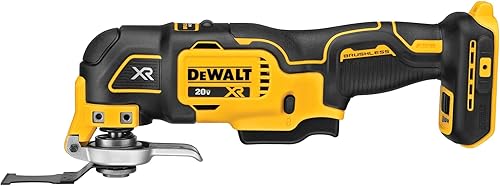
- Brushless motor
- 3-speed selector
- Dual-Grip variable-speed trigger
- Tool-free Quick-Change system
- LED light
Choose this bare tool for trim cuts and small repair jobs if you already have a compatible DeWalt battery and charger. Its trigger lets you ease into a cut, while wrench-free changes help when a job needs several attachments.
Pros
- Selectable speed limits with trigger control
- Accessory changes need no wrench
- Universal adapter supports most accessory brands
- LED lights shaded work surfaces
Cons
- Battery and charger sold separately
- Sanding pads and non-wood blades require separate purchases
Its three speed ranges are 0–13,000, 0–17,000 and 0–20,000 oscillations per minute. The selector sets the upper limit, while the Dual-Grip variable-speed trigger lets you vary speed within that range.
That gives you a useful way to approach a marked cut: start gently, establish the blade's position, then increase speed without changing the selector. Use the accessory instructions to choose an appropriate range.
The Quick-Change system swaps attachments without a wrench, and the included universal adapter supports most oscillating tool accessory brands. The LED helps when a cabinet, wall or your hand casts a shadow over the cut line.
Who should buy the DeWalt DCS356B?
Buy it if you already use compatible DeWalt cordless equipment and regularly make short cuts around trim, cabinets or repairs. Trigger control is especially useful if you prefer adjusting speed as the blade enters and leaves the material.
Skip this bare-tool package if you need a battery and charger too. Also skip an oscillating tool as your main saw for repeated long cuts or large demolition work.
What comes with the bare tool, and what else do you need?
The DCS356B includes two wood-cutting blades and a universal accessory adapter, but its battery and charger are separate. Build your accessory order around the first job rather than buying attachments without a clear use.
For clean wood, an appropriate wood blade is the starting point. If the cut may meet nails or screws, choose a blade rated for those materials instead of relying on the included wood blades.
Sanding requires a suitable pad and sheets, while grout work needs a dedicated grout-removal attachment. A universal connection doesn't make one blade suitable for every material.
The stated tool weight is 2.4 lb, and the battery adds to the complete setup. Consider clearance as well as weight if you'll work inside cabinets or close to a floor.
Before ordering, make a short checklist:
- A compatible battery and charger.
- An attachment rated for the material.
- Eye and hearing protection.
- Suitable dust control for the task.
- A way to secure loose workpieces.
Which cordless alternative suits your work?
Keep your current battery system unless another control layout or package solves a clear need. The main choices here are a bare DeWalt tool, a DeWalt starter kit, Makita's dial-and-switch layout and Milwaukee's cutting-and-sanding package.
Makita XMT03Z: for buyers who prefer a steady setting
The Makita suits repeated passes where you want to set a speed and keep it there. Its variable-speed dial covers 6,000–20,000 OPM, and its large slide switch includes a lock-on button.
Soft start and a 2-3/8-inch barrel grip add to its control layout. Makita says its 3.2° oscillation angle is designed for faster, more aggressive cutting and sanding.
Choose it if you have compatible Makita 18V LXT batteries with the Star symbol and prefer a switch to holding a trigger. Skip it if changing speed through trigger pressure is central to how you want to work.
For a closer comparison of the controls, see our DeWalt versus Makita oscillating multi-tool comparison.
DeWalt DCS356C1: for buyers starting without batteries
The DCS356C1 suits someone who wants the DCS356 tool with the core cordless equipment in one package. It includes a battery, DCB107 charger, wood blade, wood/metal blade, universal adapter and kit bag.
Choose it for a first cordless multi-tool if those included pieces meet your needs. Skip the kit if you already have enough compatible batteries and chargers and only need another tool.
The package choice doesn't change the basic control layout. Make the decision around what you need to add to your workspace.
Milwaukee 2626-20: for M18 users doing mixed repairs
The Milwaukee suits M18 users who want to move between wood cutting and small sanding jobs. It includes a wood-cutting blade, sanding pad, assorted sheets and an adapter, with the battery sold separately.
Its 12 speed settings cover 11,000–18,000 OPM, and it has tool-free accessory changes, LED lighting and a rubberized handle covering. Choose it when those included sanding pieces match your first project.
Skip it if you already have DeWalt equipment and no reason to add an M18 battery setup. Its lower maximum oscillation rate alone isn't a reason to reject it; blade choice and the task also shape cutting progress.
For more options across control styles and battery systems, see our best oscillating multi-tools.
Which jobs suit an oscillating tool, and which need another saw?
Short, awkward cuts and small surface repairs suit an oscillating tool best. Think of trimming a door casing for flooring, making a controlled opening or sanding a corner that a larger sander can't reach.
For a casing undercut, use a flooring offcut as a height reference where appropriate. Check that the blade can reach the full cut without the tool body or battery striking nearby surfaces.
For a plunge cut, mark the outline and depth before starting. Keep the opening no larger than necessary, especially where a cover plate or fitting must hide its edges.
Long board cuts and repeated thick-stock cuts call for a saw designed for that work. Our reciprocating saw versus oscillating multi-tool guide explains the difference between close detail work and larger cutting tasks.
Drywall needs extra care because wires and pipes may sit behind the surface. Read our guide to cutting drywall with an oscillating multi-tool before making an opening in a finished wall.
How should you set up the DCS356B before the first cut?
Remove the battery, fit the correct attachment and check its seating before powering the tool. A secure blade and a supported workpiece matter more than starting at the highest speed.
Follow this order:
- Identify the material and check for hidden fasteners or services.
- Select an attachment rated for both the material and the tool connection.
- Fit it using DeWalt's instructions, adding the adapter when required.
- Check that the attachment is fully seated and secured.
- Position the blade so the tool body clears nearby surfaces.
- Secure the workpiece, mark the cut and plan your stopping point.
- Install the battery and begin at an appropriate controlled speed.
Don't assume a blade is secure because the clamp has closed. Check the mounting carefully, especially when using an adapter or changing blade orientation.
For a fuller walkthrough of grip, positioning and cutting technique, see how to use an oscillating multi-tool.
How do you get cleaner cuts without forcing the tool?
Use light, steady pressure and let the blade remove material. Pushing harder can create heat, bend the blade and make it harder to hold the cut line.
Start a cut with the blade aligned to the mark. Once a shallow path forms, advance gradually while keeping the tool square to the intended cut.
For a wider opening, work along the marked edges rather than twisting the blade sideways to enlarge the slot. Avoid using a cutting blade as a pry bar.
If progress slows, stop and check for packed debris, worn teeth or the wrong blade type. Increasing speed won't fix a wood blade that has reached a metal fastener.
For sanding, keep the pad flat and move across the surface. Heavy pressure on one corner can leave a hollow or wear the sheet unevenly.
What should you expect from battery runtime?
Plan runtime around your battery and workload, rather than a fixed number of minutes. DeWalt says the brushless motor provides up to 57% more runtime than a similar brushed tool.
That comparison isn't a per-charge schedule for your project. Continuous cutting, intermittent trimming and light sanding place different demands on a cordless tool.
If a job must continue without a charging break, arrange a charged compatible spare. For occasional repairs, start with your existing compatible pack and judge whether its working time meets your needs.
Keep the charger accessible and follow its instructions for charging and storage. Don't plan a full project around an uncharged pack.
Which common mistakes cause poor results?
Wrong blades, excess pressure and poor depth control cause more avoidable trouble than choosing the wrong top speed. Check those first if the tool isn't making the cut you expected.
- Using a wood blade on unknown material: inspect for nails and choose a suitable blade before cutting.
- Buying by mount shape alone: confirm both tool compatibility and the attachment's intended use.
- Starting at full speed near a finished edge: establish the cut carefully before increasing speed.
- Forcing a dull blade: replace worn accessories instead of leaning harder on the tool.
- Plunging beyond the required depth: account for what may be behind or beneath the work.
- Treating an LED as a safety check: light helps visibility but cannot reveal hidden wires or pipes.
Use a scrap piece of the same material to settle your blade position and approach before working on the finished part. This is especially useful for a visible trim edge or a close-fitting opening.
How should you care for the tool and attachments?
Keep vents clear, clean the accessory mount and replace damaged attachments. Remove the battery before inspecting, cleaning or changing parts.
Allow a hot blade to cool before handling it. Clear debris from the mount so the next attachment can seat properly, following the manual's cleaning guidance.
Check blades for bent sections, damaged teeth and cracks. Inspect sanding pads and sheets too, since worn or loose abrasive material can spoil a small repair.
Store blades so their cutting edges don't strike other tools. Keep the tool and battery dry, and follow DeWalt's storage instructions rather than leaving them exposed to job debris.
Should you choose the DeWalt DCS356B or another package?
Choose the DeWalt DCS356B if you already have compatible DeWalt batteries and need controlled cuts in tight spaces. Add only the attachments your first projects require.
Choose the DCS356C1 if you're starting without a battery and charger. Choose the Makita for its dial-and-lock-on control style, or the Milwaukee if your M18 setup and mixed cutting-and-sanding work make its package useful.
Before ordering, name the first cut you'll make and the blade it needs. If you're still deciding which tool category fits that job, use our complete reciprocating saw and multi-tool guide.
Frequently asked questions
Does the DeWalt DCS356B include a battery and charger?
No, the DeWalt DCS356B requires a separately purchased compatible battery and charger. The package includes the tool, a universal accessory adapter and two wood-cutting blades.
If you're starting without cordless equipment, compare the DCS356C1 kit before assembling a separate tool, battery and charger order.
What speed does the DeWalt DCS356B reach?
The DeWalt DCS356B reaches 20,000 oscillations per minute in its highest setting. Its three selectable ranges are 0–13,000, 0–17,000 and 0–20,000 OPM.
The variable-speed trigger adjusts speed within your chosen range, so you can begin gently and increase speed as the blade settles into the cut.
Can the DCS356B use other brands' accessories?
Yes, the DCS356B includes a universal adapter for most oscillating tool accessory brands. Confirm the attachment's mounting compatibility and intended material before buying.
An adapter solves a connection issue, not a blade-selection issue: a wood blade still isn't the right choice for grout or an unexpected metal fastener.
How does the DCS356B differ from the DCS356C1 kit?
The main difference is the package: the DCS356B is the bare-tool option, while the DCS356C1 adds a battery, charger and kit bag. The bare tool includes two wood-cutting blades.
The kit pairs a wood blade with a wood/metal blade, so choose around your existing cordless equipment and first project.